Features From table to end of day, every module of MenuPos.
Below you find what each module does and its capabilities. The few capabilities that are not available yet are marked “On the roadmap”.
Capabilities labeled “On the roadmap” are not available yet; everything without the label can be used today.
At a glance
Choose a module: what it does and its capabilities are below.
The core of selling
From table to end of day, the modules used every day.
- Account and organizationThe business’s account, branches, team and devices. Staff sign in on a paired device with their own PIN.5 capabilities
- Menu and productsProducts are defined for the whole business; a branch can set its own prices and which products it sells.6 capabilities
- Floors and tablesFloors and tables sit on a floor plan; a table’s status is shown with both colour and words.5 capabilities
- Orders and checksDine-in, takeaway, delivery and quick sales share one order model. Items are never deleted; voids and complimentary items are records of their own.6 capabilities
- PaymentsAn order can be closed with several payments. Payment records are only added; a correction is a reversal.6 capabilities
- Register and end of dayPayments and cash movements are written to an open register session. A business day is not a calendar day: a bar closing at 02:00 books to the day before.5 capabilities
- KitchenOrders are split across stations; each station has a printer or a display. The kitchen display is a mode of MenuPos Kasa; it also opens in the browser from the panel, so any tablet can be a kitchen display.5 capabilities
- PrintingThe cloud cannot reach a printer on the local network; a print station at the branch does the printing.4 capabilities
- ReportsReports read the sales records; every report uses the same definition of sales and can show the branches side by side.5 capabilities
- Owner appMenuPos Patron, the owner app: the live picture, reports and approvals on the phone for owners and managers.4 capabilities
- QR menuThe menu guests open on their phone, without installing an app.5 capabilities
- Multiple branches (head office)Menu, prices and reports are managed centrally; a branch can set its own prices and which products it sells.3 capabilities
- SubscriptionThe business manages its subscription from the web panel.2 capabilities
Growing the business
Stock, customers, delivery, integrations and staff.
- Stock and recipesA sale draws its recipe from stock by itself. Stock levels are computed from movements.5 capabilities
- Customers and accountsA customer’s phone, email and address are stored protected.3 capabilities
- DeliveryFrom the order taken on the phone to the delivery.4 capabilities
- Food delivery platformsPlatform orders follow the same kitchen and payment flow at the register as table orders. A connection is set up with the integration details of your restaurant’s account on the platform.4 capabilities
- ReservationsThe reservation book and the floor plan work together.5 capabilities
- Discounts and promotionsPredefined discounts apply with a permission and a limit.3 capabilities
- Fiscal POS devices (ÖKC)A sale becomes a fiscal receipt on the fiscal POS device at the register. The device link is on the roadmap and depends on partnerships with device makers.2 capabilities
- e-Documentse-Archive and e-Invoice through an e-document provider.4 capabilities
- Staff and shiftsThe hours staff work and how they perform.3 capabilities
- Expenses and financeExpenses in the same place as sales.2 capabilities
- Order and pay at the tableFrom the QR code on the table, guests call the waiter, ask for the bill or place their order; the order lands in the register’s incoming orders.3 capabilities
- LoyaltyTo know your regular guests.2 capabilities
- Scales and barcodesFor products sold by weight or by barcode.3 capabilities
Account and organization
The business’s account, branches, team and devices. Staff sign in on a paired device with their own PIN.
Sign-up and sign-in
Email and password, two-step verification, managing open sessions.
Team and roles
Cashier, waiter, kitchen, courier, branch manager, owner and accountant roles; permissions come from the role.
Branches
All the branches of a business in one account; access is given per branch.
Device pairing
Registers, waiter phones and kitchen displays join a branch with a one-time code; a device can be removed from the panel.
Staff and PIN
Staff sign in on the device with a 4-digit PIN; repeated wrong attempts lock the sign-in.
Menu and products
Products are defined for the whole business; a branch can set its own prices and which products it sells.
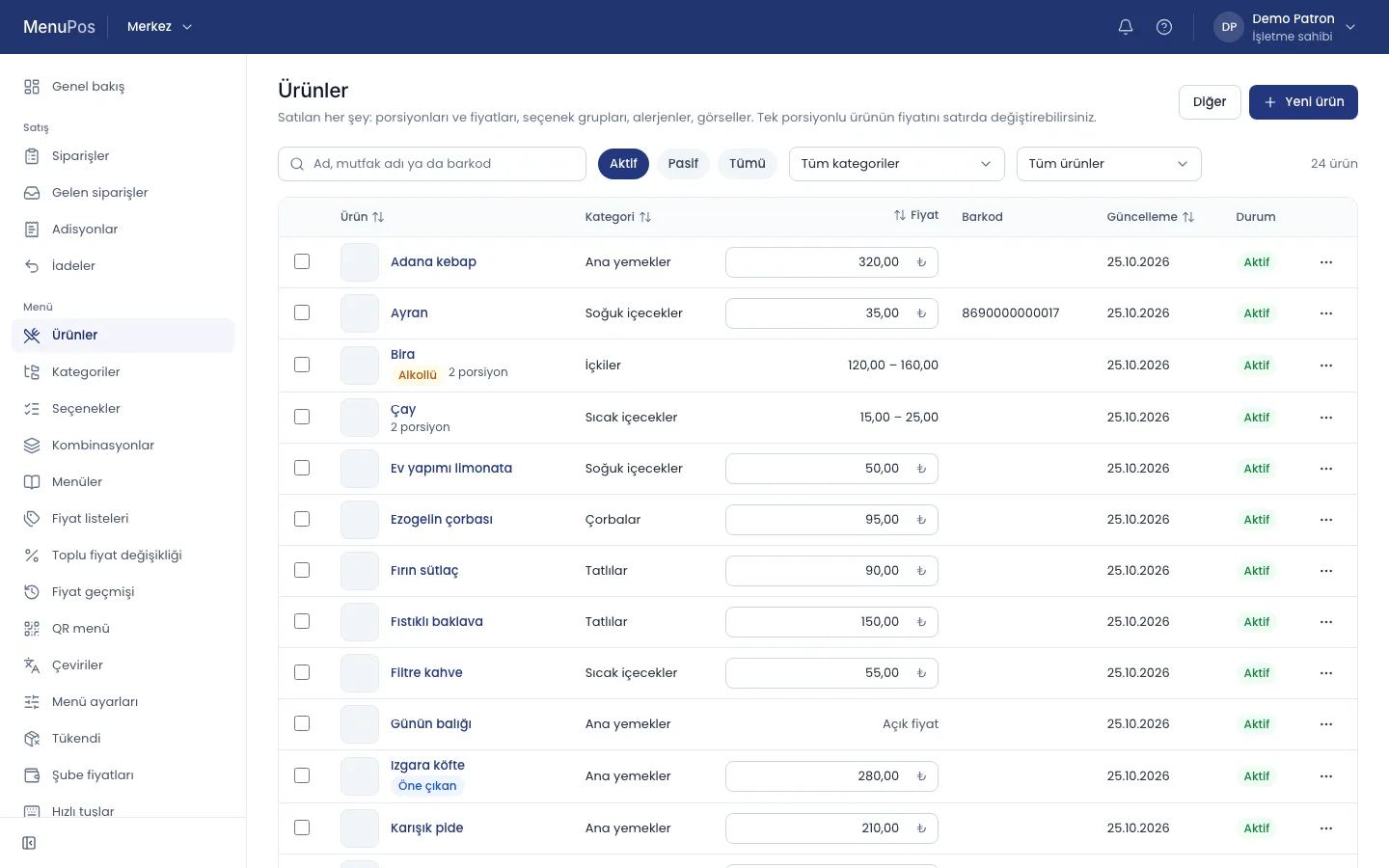
Categories and products
Ordered categories, product images, products on or off sale.
Portions
Choices with their own price, such as small, medium, large or 1 and 1.5 portions.
Option groups
Options such as rare or extra cheese; required or not, minimum and maximum choices, price difference.
Combo meals
Bundles with choice groups, such as a burger meal.
VAT and price lists
VAT rate per product and channel; separate price lists for dine-in, delivery and branches. Prices include VAT.
Menus
Which product sells at which time and on which channel, such as breakfast, dinner or the QR menu.
Floors and tables
Floors and tables sit on a floor plan; a table’s status is shown with both colour and words.
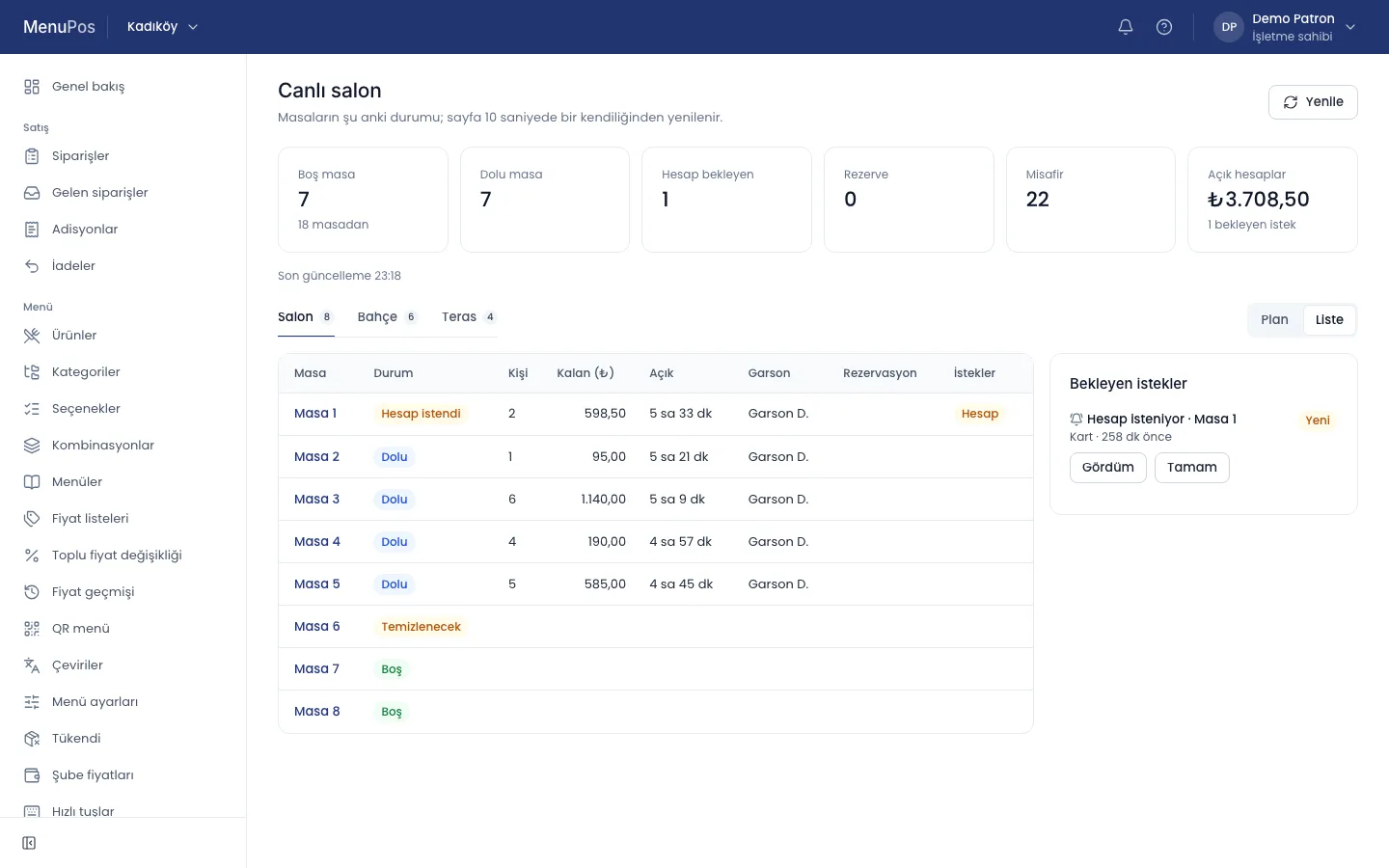
Floors
Sections such as the dining room, garden or terrace; ordered, deactivated instead of deleted.
Floor plan
Tables placed by drag and drop; capacity and shape per table.
Tables in bulk
Numbered tables added to a floor in one go.
Table status
Free, occupied (with amount and time), bill requested and reserved; derived from open orders and reservations.
Table QR codes
Each table’s QR code takes the guest to that table’s menu.
Orders and checks
Dine-in, takeaway, delivery and quick sales share one order model. Items are never deleted; voids and complimentary items are records of their own.
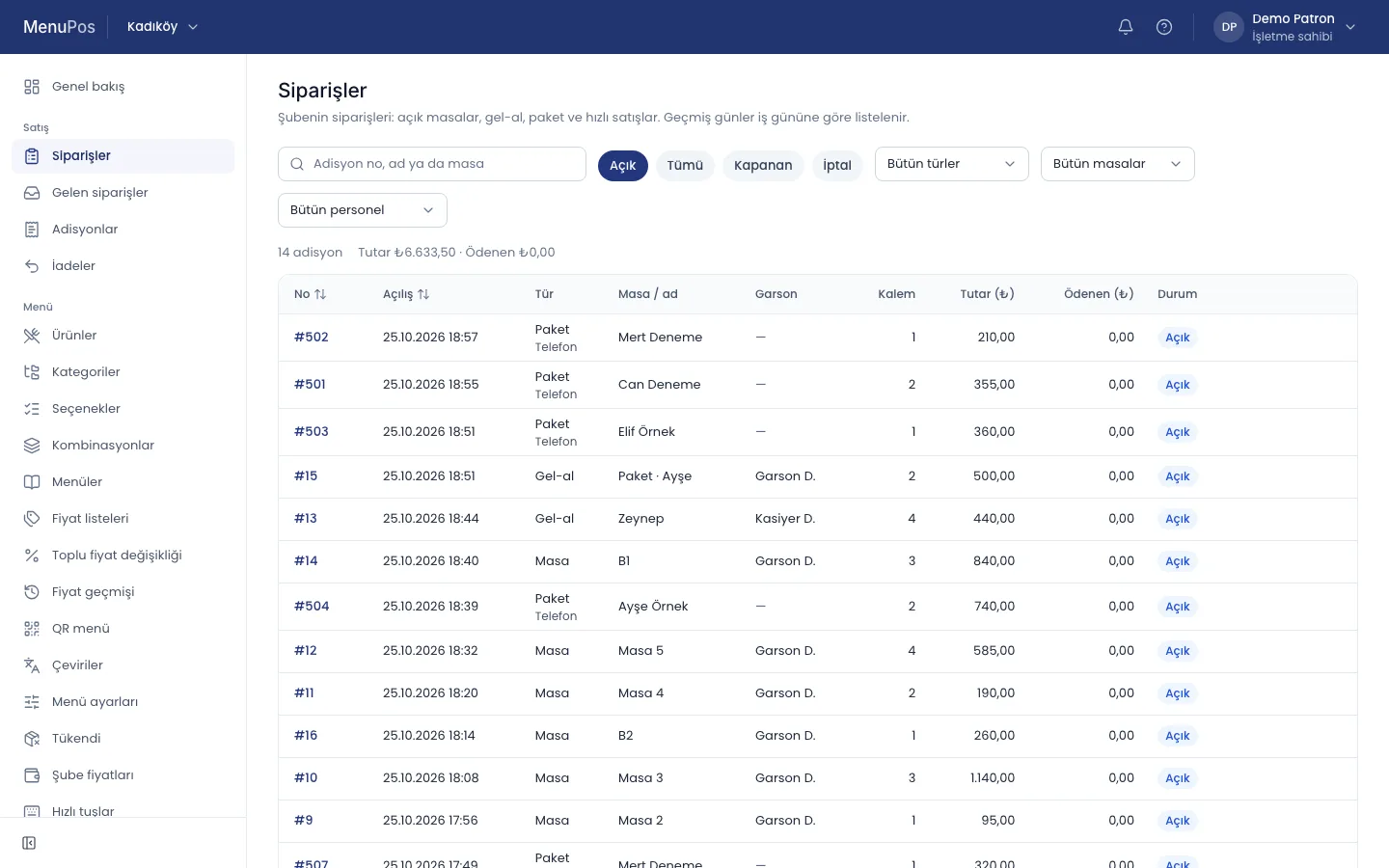
Order types
Dine-in, takeaway, delivery and quick sales without a table.
Items, options and notes
Items are added with their portion, options and a note for the kitchen.
Sending to the kitchen
Items sent together make a round; a round is split into tickets by the items’ stations.
Moving and merging tables
An order or some items moved to another table; the trail remains.
Voids, complimentary items and discounts
With a reason and a manager’s approval; voiding an item already sent prints a void ticket in the kitchen.
Check
The informational slip printed when the table asks for the bill.
Payments
An order can be closed with several payments. Payment records are only added; a correction is a reversal.
Payment methods
Cash, card, meal card, bank transfer and on account.
Mixed payment
Part of the bill in cash, part by card.
Bill splitting
By item, equally per person or by a free amount.
Change and voluntary tips
Change is calculated; a tip the guest chooses to leave is recorded with the payment and stays out of sales.
Refunds
Against a closed order, by item and amount; a reversal with the payment method.
Card terminal link
On the roadmapThe amount sent from the register to the card terminal and the result coming back by itself. Today a card payment is taken on the terminal and recorded at the register.
Register and end of day
Payments and cash movements are written to an open register session. A business day is not a calendar day: a bar closing at 02:00 books to the day before.
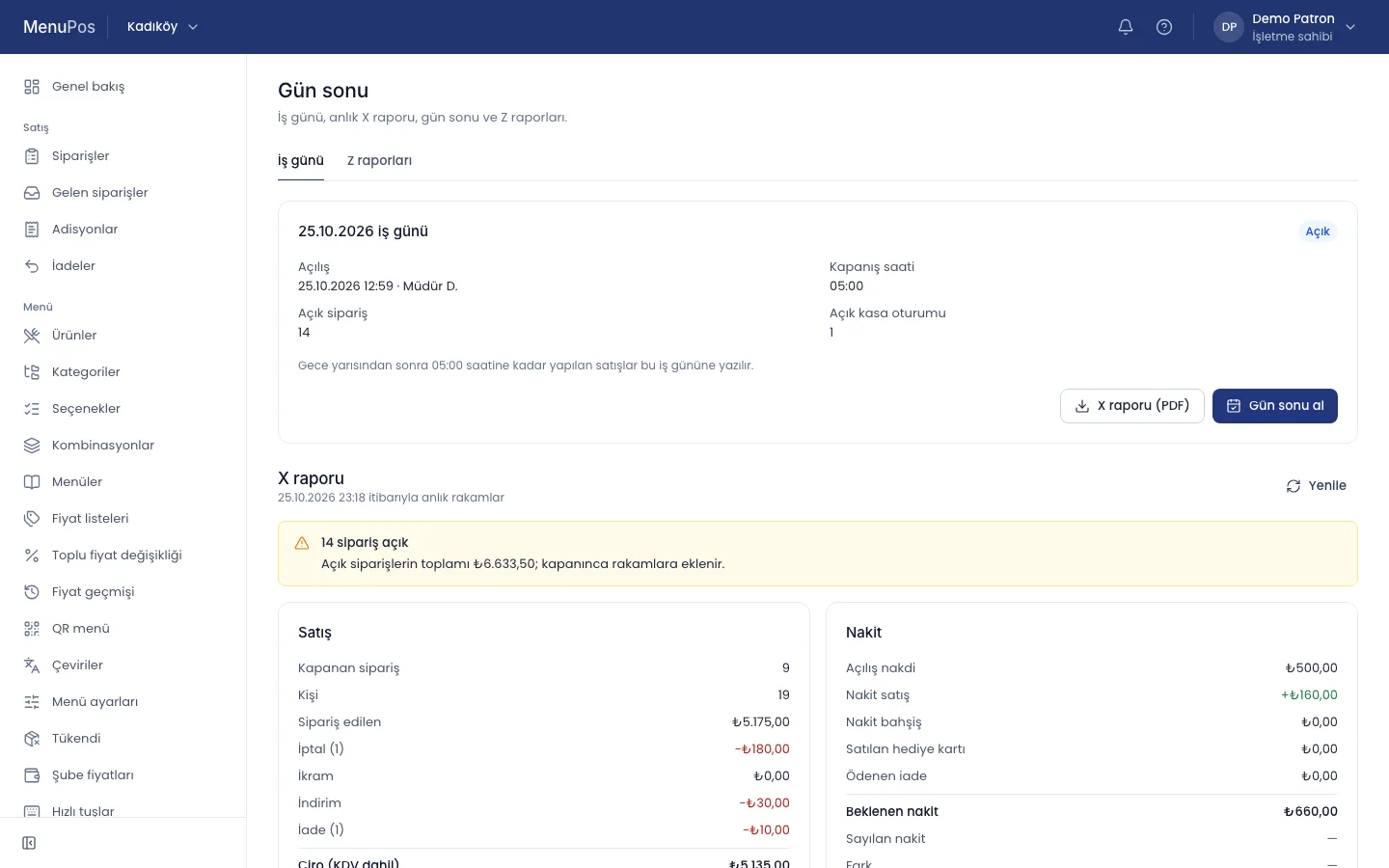
Register session
The register opens with a float and closes with a count.
Cash in and out
Money put into and taken out of the register during the day, with a reason.
Count and difference
The difference between counted and expected cash is recorded.
X and Z reports
X is an interim report; Z the report of a closed business day.
End of day
When every register is closed the day closes and its reports are frozen.
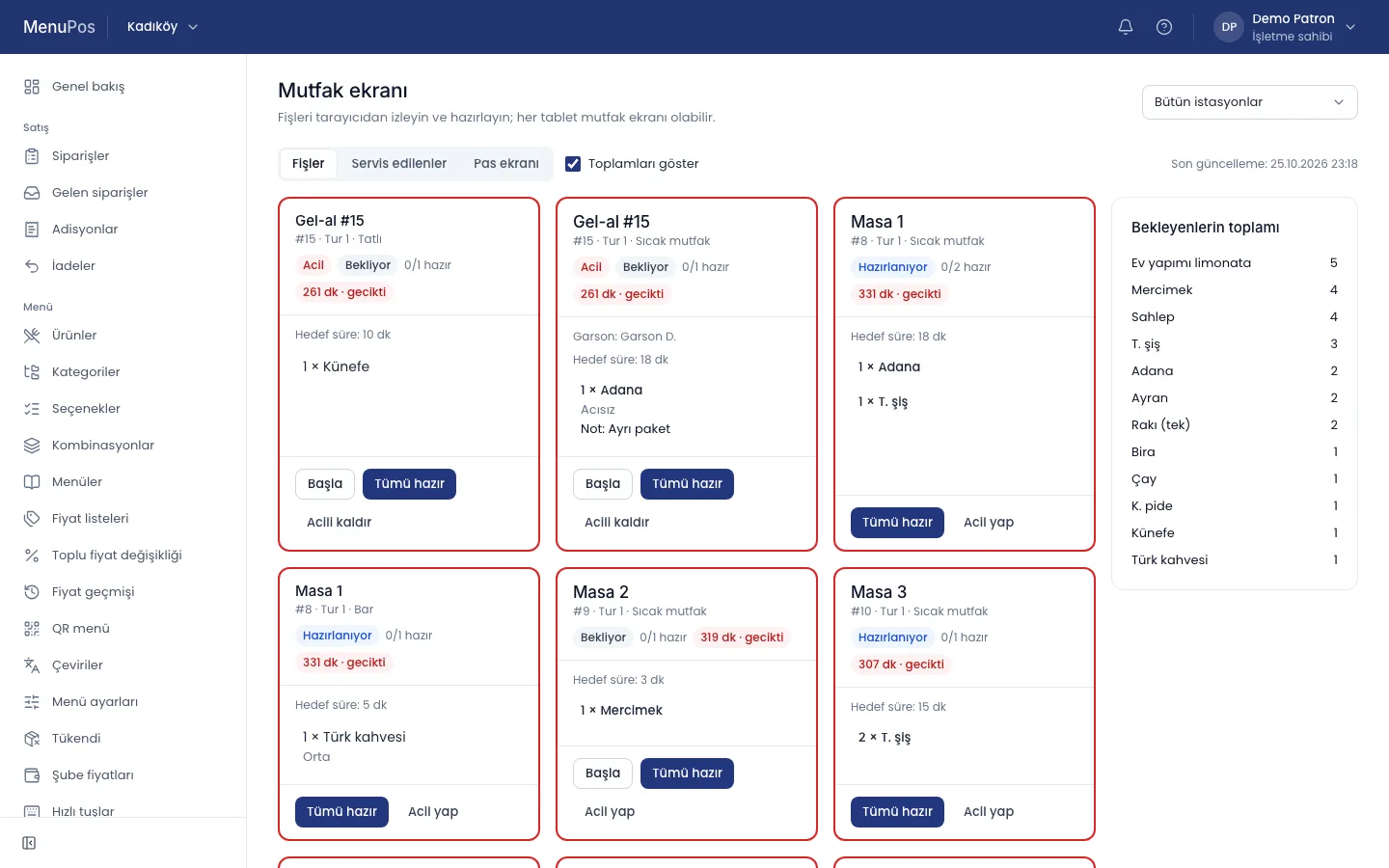
Kitchen
Orders are split across stations; each station has a printer or a display. The kitchen display is a mode of MenuPos Kasa; it also opens in the browser from the panel, so any tablet can be a kitchen display.
Stations
Hot, cold, bar, desserts; a category or a product belongs to a station.
Kitchen printers
Each round prints its own ticket at the station’s network printer.
Kitchen display
Tickets in order of arrival; an item or a ticket is marked “ready”, an urgent ticket moves up, a served one can be recalled.
Preparation time
Waiting time on the ticket; a badge and a note when it runs over.
Totals to prepare
How many of each product are waiting: “5 lemonades, 4 lentil soups”.
Printing
The cloud cannot reach a printer on the local network; a print station at the branch does the printing.
Receipt templates
Header, footer, logo and fields of receipts, checks and kitchen tickets; a branch setting.
Network printers
ESC/POS receipt and kitchen printers on the local network; paper width and code page per printer.
Print station
Usually the register; it takes the jobs, sends them to the printer and reports the result. If a printer is down, the job is rerouted to another.
USB, Bluetooth and serial printers
On the roadmapPrinters attached to the register by cable or Bluetooth.
Reports
Reports read the sales records; every report uses the same definition of sales and can show the branches side by side.
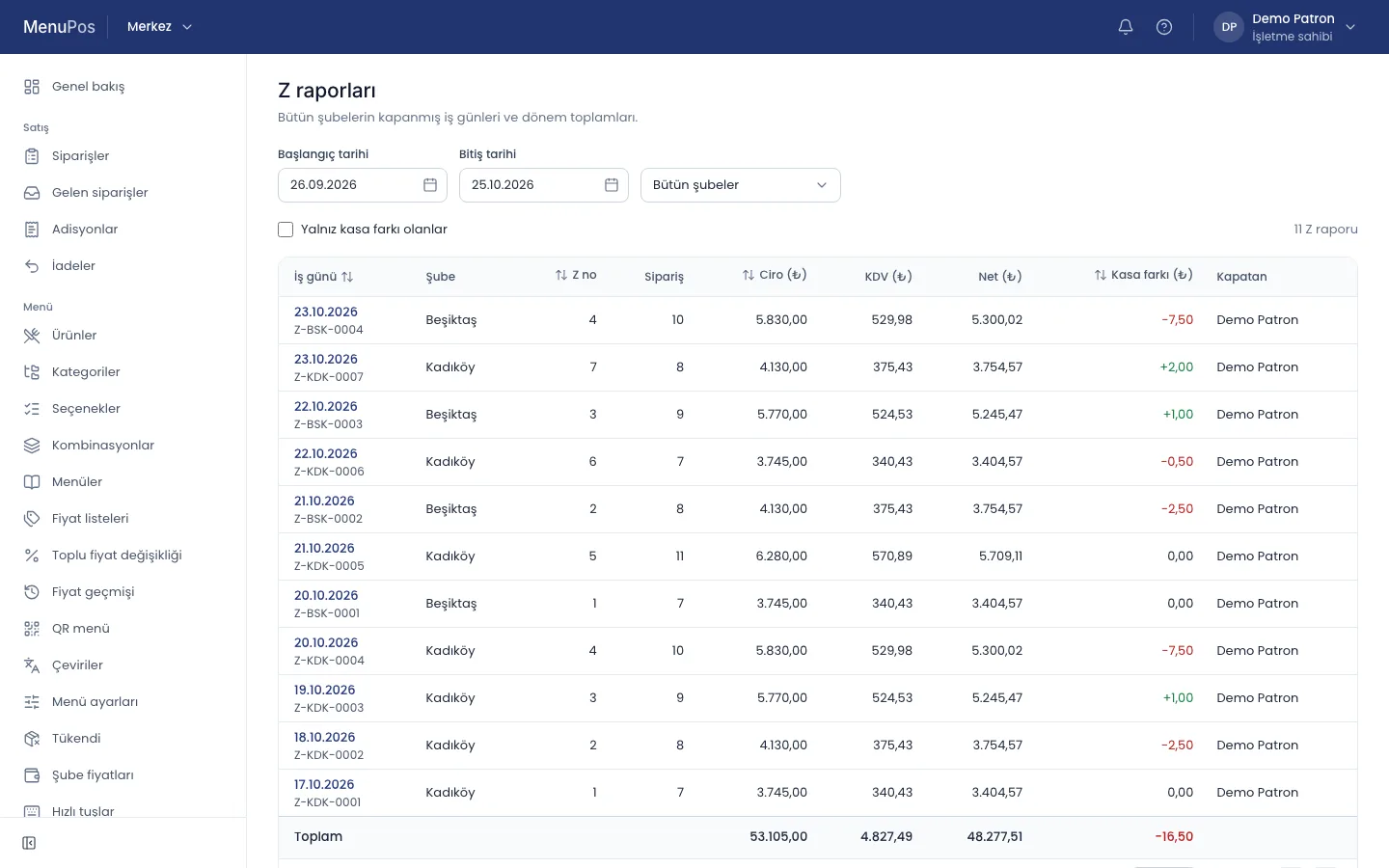
End of day
The day’s sales, payments, voids, complimentary items and register differences.
Sales reports
By product, category, hour, staff member, channel and payment method.
Voids, complimentary items and discounts
Who, when, for what reason and approved by whom.
VAT breakdown
Net amount and tax per rate.
Export
Excel, CSV and PDF.
Owner app
MenuPos Patron, the owner app: the live picture, reports and approvals on the phone for owners and managers.
Today
- Kadıköy5 open tables11,200.00
- Moda2 open tables7,250.00
Live sales
The day’s sales and open checks.
Open tables
Which table has how much open.
Branch comparison
The branches’ sales side by side.
Notifications and approvals
Important actions such as voids, complimentary items or register differences in the inbox and by email; an action waiting for approval is approved from the phone.
QR menu
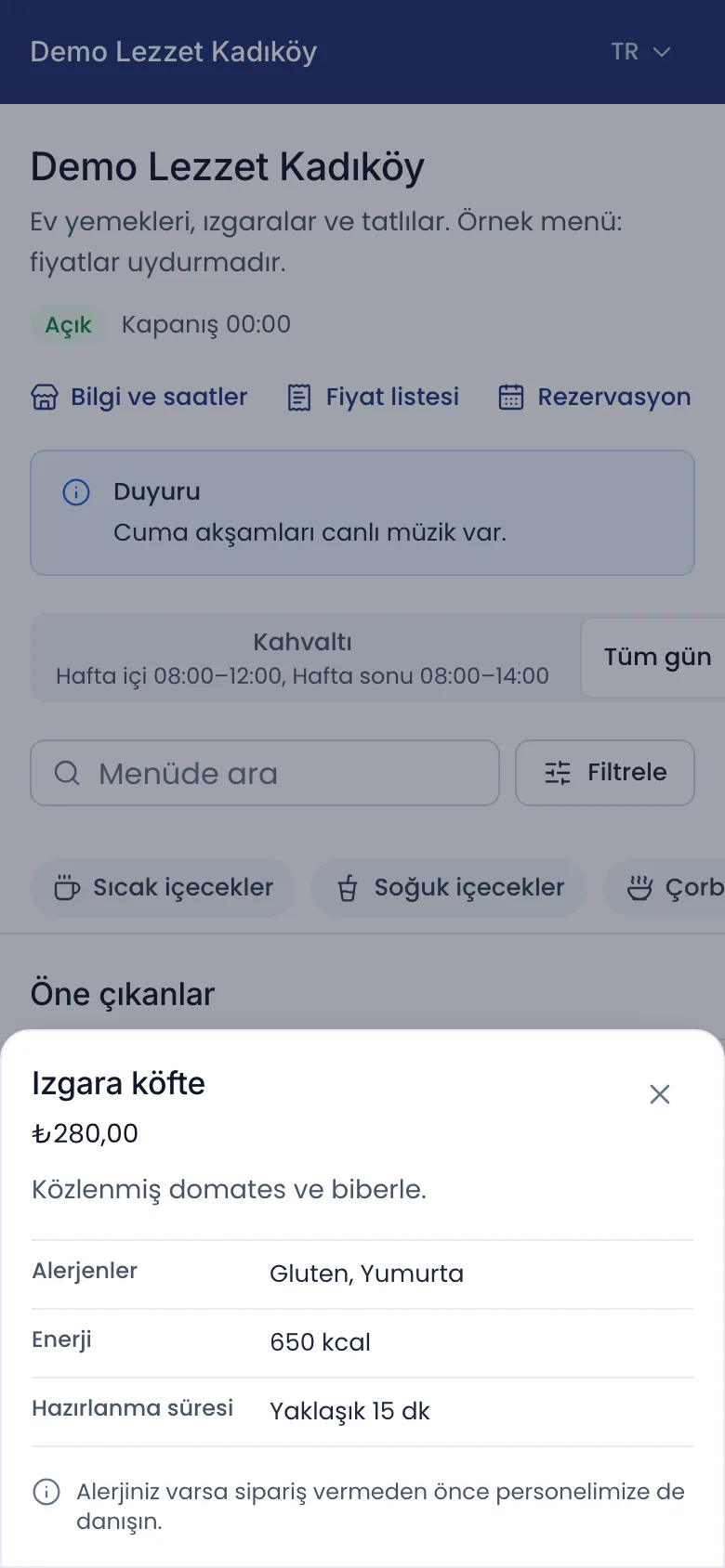
The menu guests open on their phone, without installing an app.
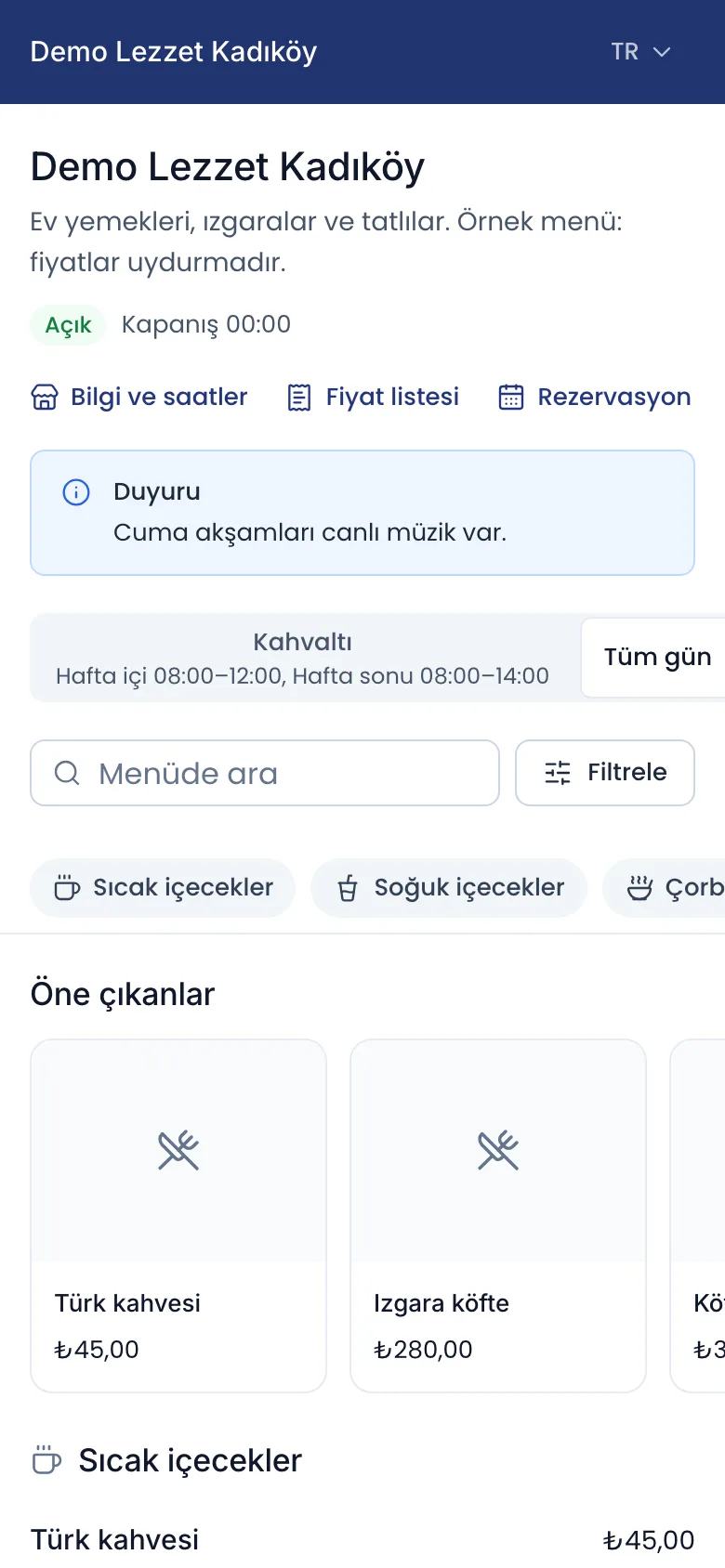
Branch and table QR codes
Each branch and each table has its own address; every table’s QR code is ready to print.
Several languages
The menu in the language the guest chooses.
Allergens and calories
Allergen, calorie and diet information per product; guests filter the menu by them.
Prices
Product prices from the register’s price list, with VAT included; the menu lists no charge other than the product price.
A menu that follows the price list rules
A QR menu and a printed list that follow the price list rules.
Multiple branches (head office)
Menu, prices and reports are managed centrally; a branch can set its own prices and which products it sells.
Menu and prices from the head office
Menus and price lists distributed to the branches from the head office.
Branch comparison
The branches’ sales in one report.
Transfers between branches
Stock moved between branches with request, approval and delivery.
Subscription
The business manages its subscription from the web panel.
Plan and trial period
The business’s plan and trial period shown in the panel.
Payment on the web
The subscription paid by card from the web panel.
Stock and recipes
A sale draws its recipe from stock by itself. Stock levels are computed from movements.
Ingredients and units
Kilograms, litres, pieces, portions; with conversion factors.
Recipes
The ingredients a product or portion uses when it sells.
Purchases, counts, waste and transfers
Supplier purchases, count differences, waste and moves between storerooms.
Low stock
A warning when an ingredient runs low.
Cost and margin
Recipe cost and margin per product.
Customers and accounts
A customer’s phone, email and address are stored protected.
Customer card
A person or a company, with addresses.
On account and collections
A sale on account is a debit, a collection a credit.
Statement and ageing
The customer’s movements and debt by due date.
Delivery
From the order taken on the phone to the delivery.
Phone orders
The customer is found by phone number and a delivery order opens with the saved address.
Courier assignment
The order given to a courier, and its delivery status.
Courier app
MenuPos Kurye, the courier app: assigned deliveries, handover and payment.
Caller ID
On the roadmapThe incoming call’s number shows at the register and opens the customer card and last address by itself.
Food delivery platforms
Platform orders follow the same kitchen and payment flow at the register as table orders. A connection is set up with the integration details of your restaurant’s account on the platform.
Trendyol Go, Getir and Yemeksepeti
A connection per platform; the register shows where an order came from.
Order status
Accepted, rejected, ready and on the way are passed to the platform.
Menu and stock sync
Products on or off sale, and whether the store is open.
Migros Yemek
On the roadmapMigros Yemek orders arriving at the register.
Reservations
The reservation book and the floor plan work together.
Reservation book
Date, time, number of guests and a note.
Table assignment
A reserved table shows a badge on the floor plan.
Arrived, no-show
Seated, completed, no-show and cancelled.
Email reminders
A reminder of the reservation for the guest, with a confirmation link.
SMS reminders
On the roadmapThe reminder and the “your table is ready” message by text message.
Discounts and promotions
Predefined discounts apply with a permission and a limit.
Predefined discounts
A percentage or an amount, on the order or on an item.
Timed promotions
Rule-based promotions such as happy hour or buy two, pay one.
Coupons
A discount applied with a code.
Fiscal POS devices (ÖKC)
A sale becomes a fiscal receipt on the fiscal POS device at the register. The device link is on the roadmap and depends on partnerships with device makers.
Fiscal receipt
Each sale turns into a fiscal receipt; its number is stored with the payment.
Z matching
The day’s close is matched with the fiscal device’s Z report.
e-Documents
e-Archive and e-Invoice through an e-document provider.
e-Archive and e-Invoice
An e-document for guests who ask for an invoice.
Expense voucher
Issuing expense vouchers.
Incoming e-Invoices
A supplier’s e-Invoice is taken from the provider’s inbox and becomes a draft purchase.
Line matching
On the roadmapThe incoming invoice’s lines matched with ingredients by themselves.
Staff and shifts
The hours staff work and how they perform.
Clock in and out
Start and end of work, and breaks.
Shifts
The shift plan.
Staff performance
Sales and voids per staff member.
Expenses and finance
Expenses in the same place as sales.
Expense records
Expenses by category.
Profit and loss
A simple profit and loss from sales and expenses.
Order and pay at the table
From the QR code on the table, guests call the waiter, ask for the bill or place their order; the order lands in the register’s incoming orders.
Call the waiter, ask for the bill
The request shows next to the table at the register and in the panel.
Ordering by QR
Guests order from the QR code on the table; once the register accepts, it goes to the kitchen.
Paying at the table
On the roadmapGuests pay their bill by card on their phone.
Loyalty
To know your regular guests.
Points
Points by spending; paying with points and an expiry date.
Promotions and segments
Promotions by group of guests.
Scales and barcodes
For products sold by weight or by barcode.
Scale label file
The product and price file a scale reads; the register reads the barcode of a scale label.
Barcoded products
Selling by scanning a barcode.
Live weighing
On the roadmapThe weight read directly from a scale attached to the register.
Let’s get to know your business.
Tell us how you work; we will show you MenuPos for your business and prepare our quote.