Skip to content

Point of sale and management for restaurants, cafes and bars. From table to kitchen, from register to end of day, one system.

MenuPos is a cloud system that runs a hospitality business from one place: orders at the table, kitchen display and printers, payments and bill splitting, register and end of day, stock, delivery and reports across branches. The register keeps selling when the internet goes down.

The register, waiter, courier and owner apps, the kitchen display, the management panel and the QR menu work together in one account.

Register
Sells without internet too
Sales records
Never deleted, corrected by reversal
Branches
One account, own registers
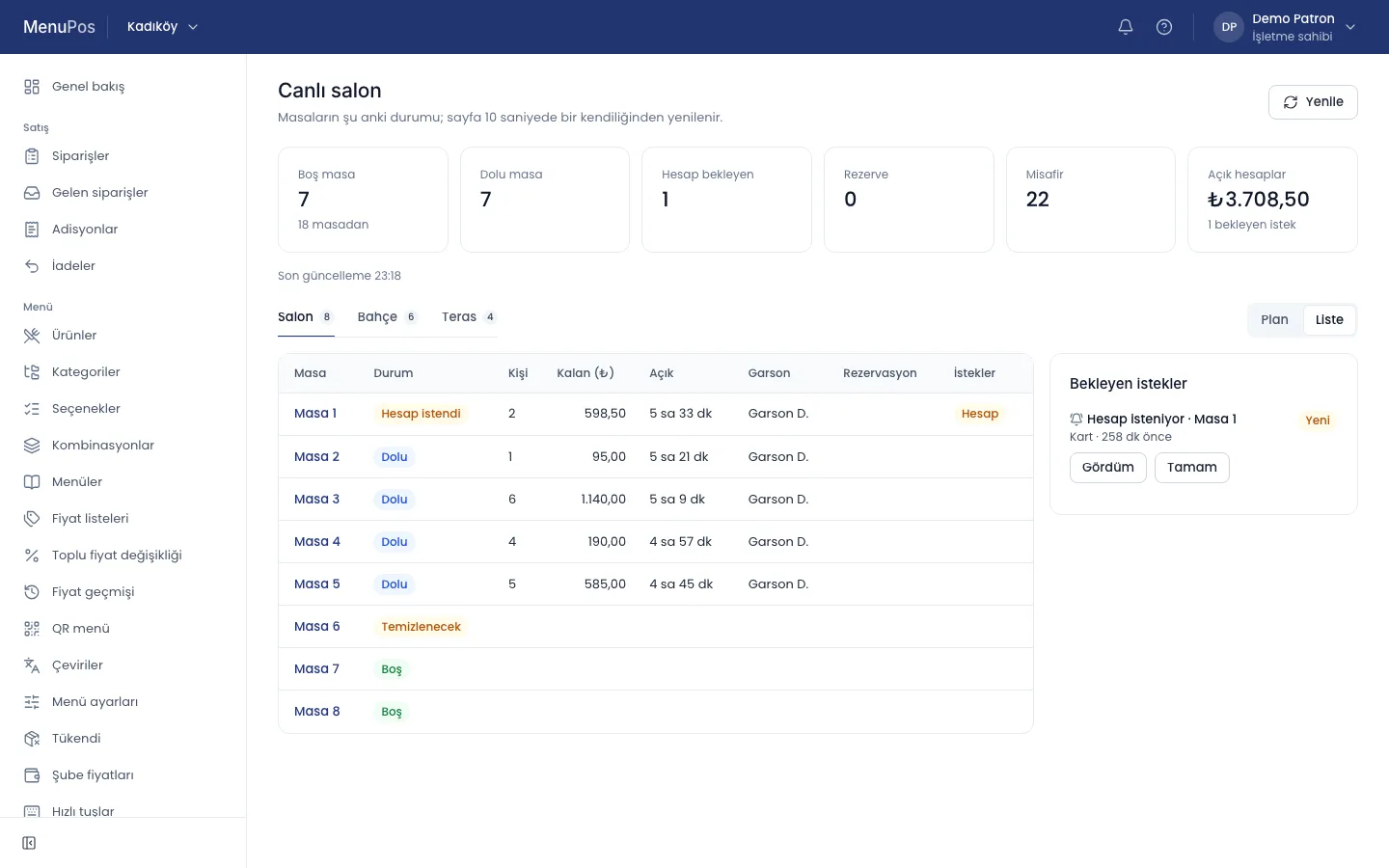
The live floor in the MenuPos panel: free, occupied and bill-requested tables, guests and the total of open checks; below, the tables with their status, amount due and waiter, and a pending bill request beside them.
Screenshot (Turkish interface) · Demo data

Who is it for?

The same product from a single cafe to a chain of branches. The kind of business sets the defaults and the sample menu; it never switches a module off.

Restaurants
Tables in the dining room, garden and terrace; orders split across kitchen stations, complimentary items and bill splitting.
Cafes
Quick sales at the register and table orders side by side; a menu guests open from the QR code on their table.
Bars
A business day that runs past midnight, open tabs and complimentary drinks with a manager’s approval.
Fast food
Takeaway and delivery orders, combo meals, the preparation queue on the kitchen display.
Patisseries
Quick sales at the counter, products by portion, table service and delivery orders.

The way of an order

From the table to the end of the day, every step works on the same record; who did what, and when, stays visible.

  1. Table

    The floor plan shows free, occupied, bill-requested and reserved tables; a table is opened at the register or from the waiter’s phone.

  2. Order

    Items are added with their portion, options and notes; the waiter on the phone and the cashier at the register write to the same order.

  3. Kitchen

    Items sent to the kitchen reach the printer or the kitchen display of their station; ready items are marked.

  4. Payment

    Cash, card, meal card or a mix; the bill is split by item or equally per person.

  5. End of day

    The cash is counted, the difference shown, the day closed; the Z report freezes the day’s sales.

A screen for every role

The cashier, the waiter, the kitchen, the owner and the guest see the same order from their own screen; each screen shows only that role’s work. The panel, kitchen display and QR menu pictures are screenshots with demo data; the register, waiter and owner apps are shown as drawings.

MenuPos Kasa

MenuPos Kasa, the point-of-sale and kitchen display app, is the screen of the cashier and the branch manager: floor plan, orders, payments, bill splitting, refunds, opening and closing the register, end of day. It runs on Windows and macOS computers, Android tablets and POS devices, and iPad.

  • Large buttons for touch screens; barcode scanner and keyboard shortcuts
  • Network printers sit on the local network; receipts and kitchen tickets print offline too
  • For staff without the permission, voids and complimentary items are approved with a manager’s PIN
Drawing · Sample data

MenuPos Garson

With MenuPos Garson, the waiter app, the waiter takes the order at the table, sends it to the kitchen, asks for the bill and, with the permission, takes the payment too. For Android and iOS.

  • Choose a table, take the order, add notes
  • Sent and ready items at a glance
  • Every record carries the waiter and the device
Drawing · Sample data

Kitchen display

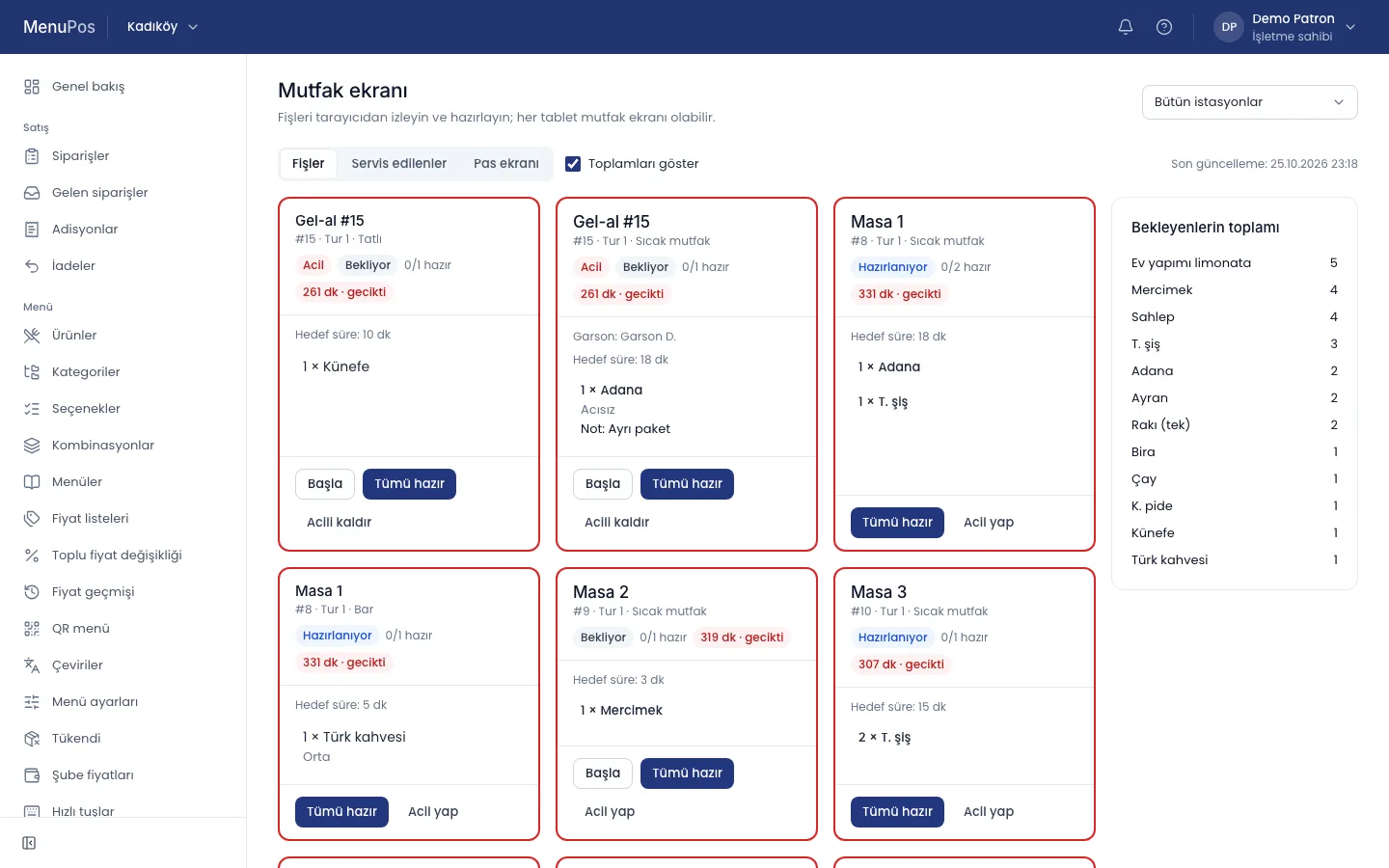
The kitchen display is not a separate app but a mode of MenuPos Kasa; it also opens in the browser from the panel, so any tablet can be a kitchen display. Tickets arrive in order; a ticket that waits too long is flagged.

  • A display or a printer per station
  • “Ready” per item or per ticket
  • A voided item shows in the kitchen too
The MenuPos kitchen display: table and takeaway tickets with their station, preparation status and waiting time; beside them, the totals still to prepare.
Screenshot (Turkish interface) · Demo data

MenuPos Patron

With MenuPos Patron, the owner app, owners and managers follow sales, open tables and branches live from anywhere, open the reports and approve what waits for them. For Android and iOS.

  • Today’s sales and open checks
  • Branches side by side
  • Important actions in the inbox and by email
Drawing · Sample data

Management panel

The menu, price lists, staff, stock, reports and branch settings are managed in the browser; a branch’s orders, tables and kitchen can be followed live.

  • Open orders, tables and the kitchen live
  • Reports per branch or side by side; Excel, CSV and PDF
  • Every change recorded with who made it and when
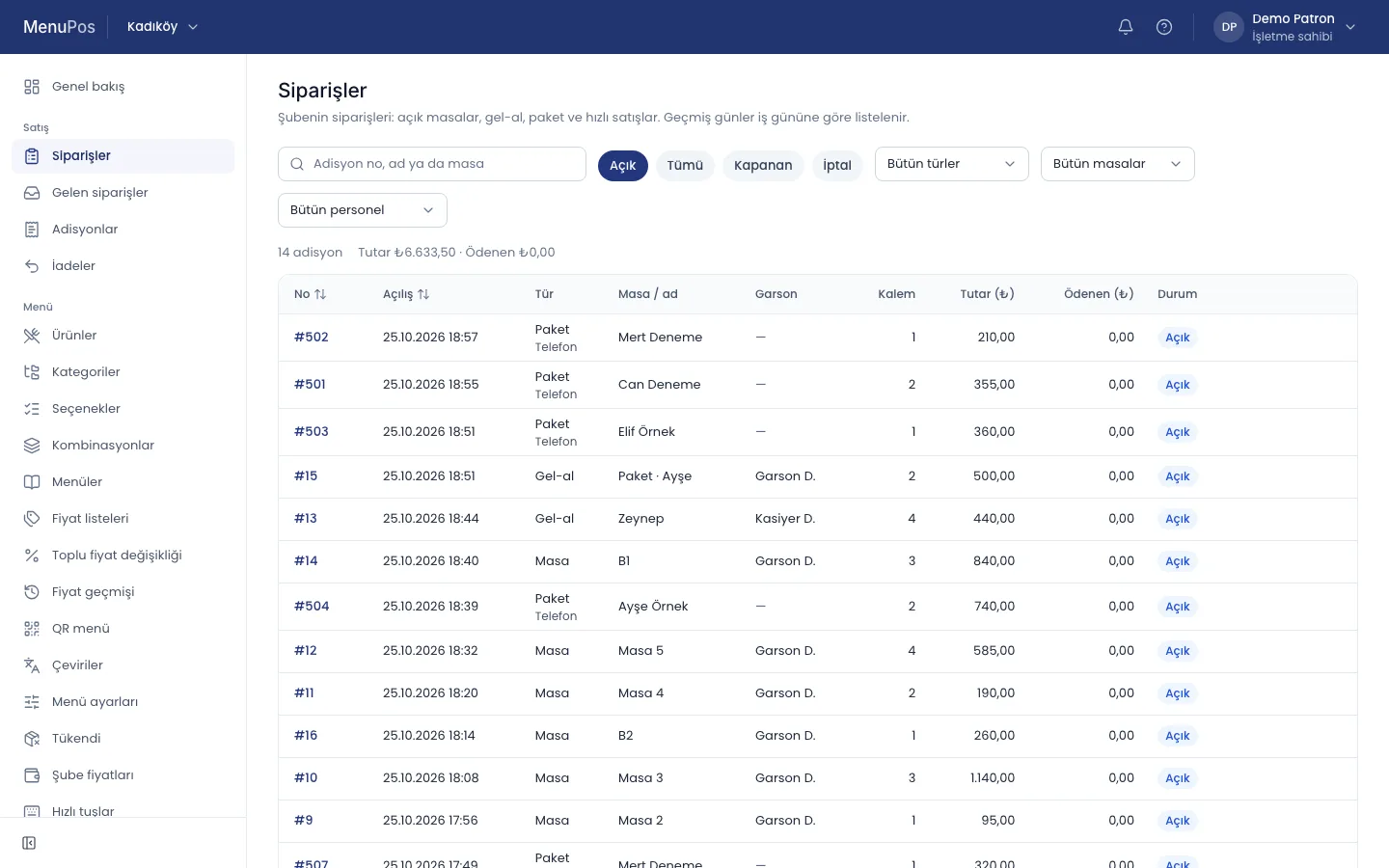
A branch’s open orders in the MenuPos panel: table, takeaway and phone delivery orders with opening time, waiter, items, amount and status.
Screenshot (Turkish interface) · Demo data

QR menu

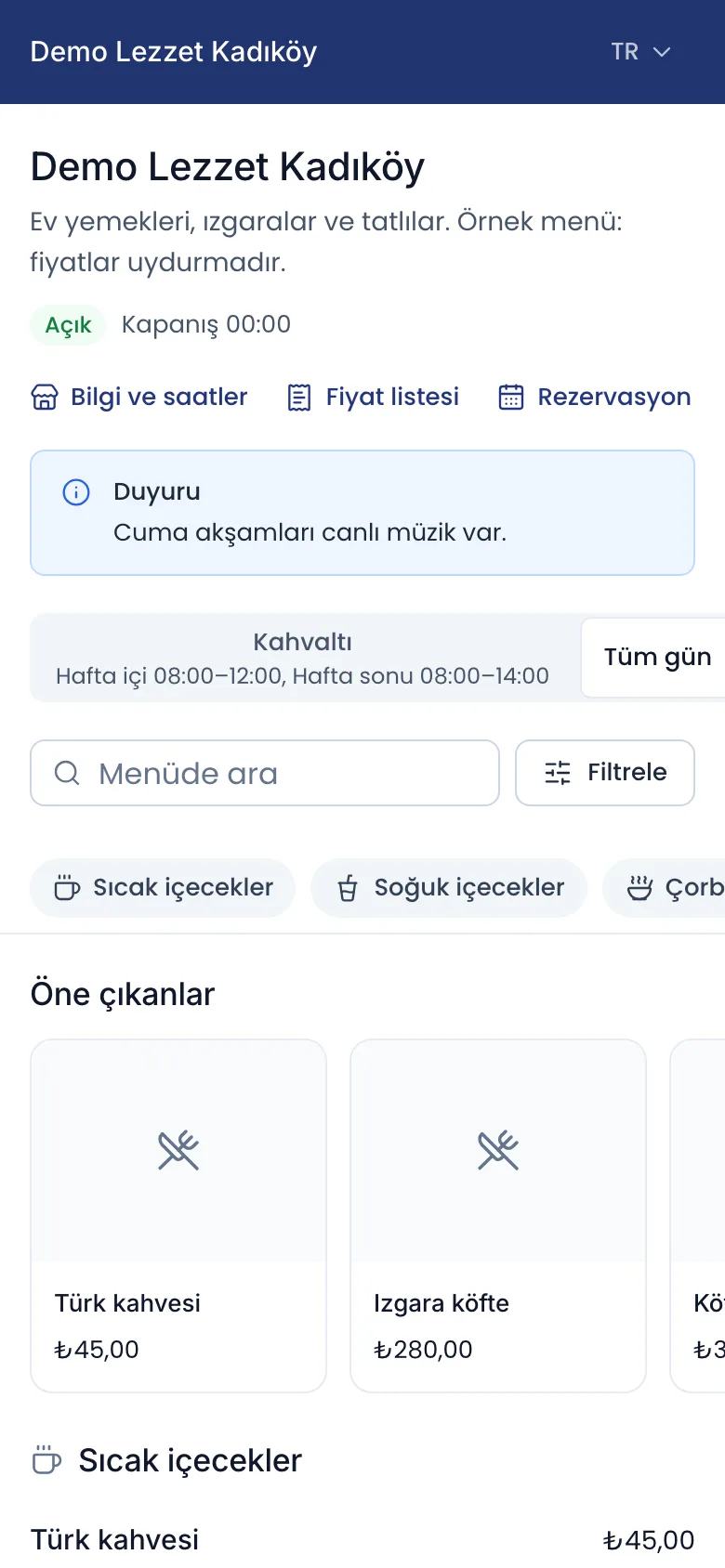
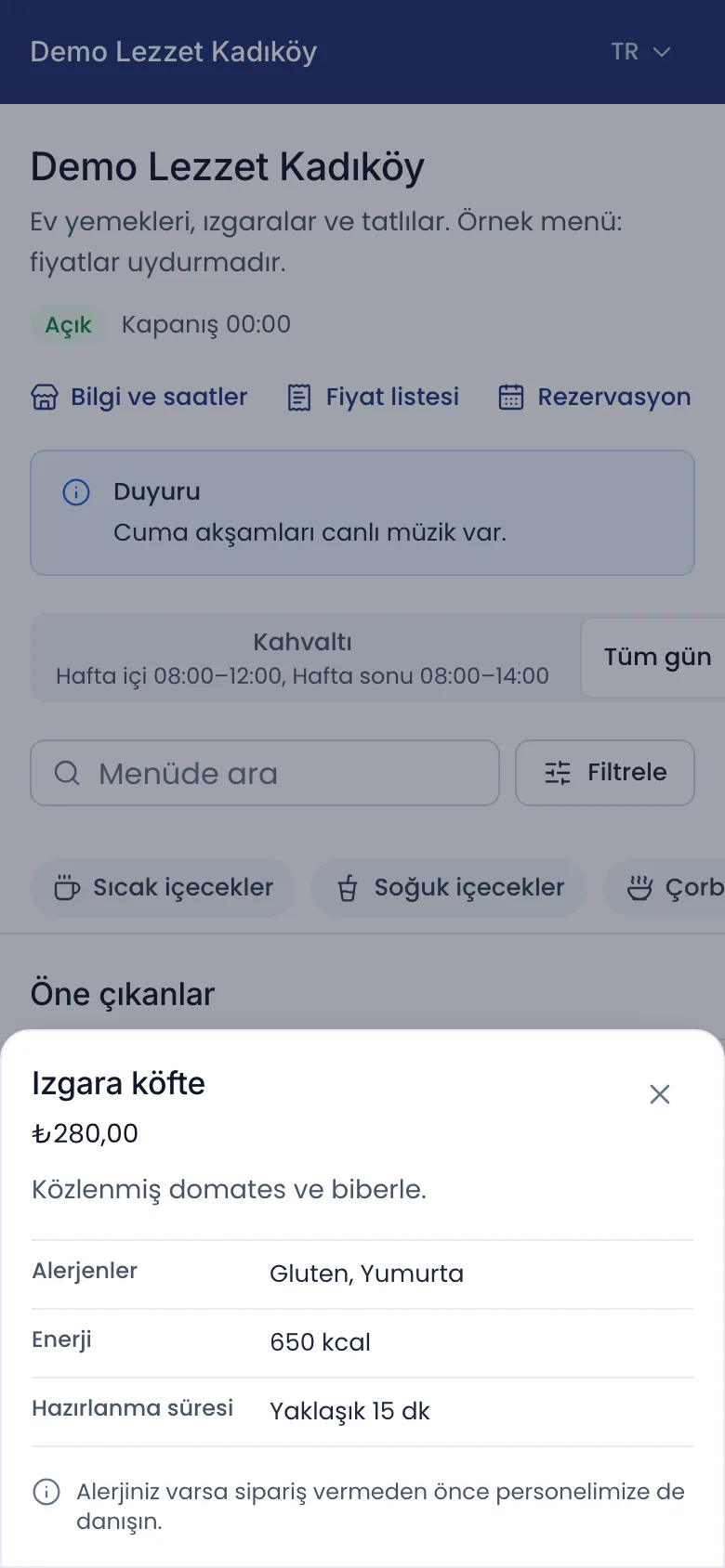
Guests scan the QR code on the table and open the menu on their phone: categories, prices, allergens and calories, several languages. They can call the waiter, ask for the bill and, if the business turns it on, place their order.

  • A QR code per branch and per table
  • Prices match the register
  • Opens in the browser, nothing to install
The QR menu on a phone: the business’s name and opening hours, links to the price list and reservations, an announcement, breakfast and all-day menus, search, categories and featured products.A product in the QR menu on a phone: grilled meatballs with price, description, allergens, energy and preparation time.
Screenshot (Turkish interface) · Demo data

From one branch to a chain

All the branches of a business live in one account. The menu and prices are managed centrally, a branch can set its own prices and which products it sells; the owner compares branches side by side.

  • Menu, price lists and staff from the head office
  • Registers, tables, printers and stock per branch
  • A branch manager sees only their own branch
  • Sales and revenue of the branches side by side

Sales go on when the internet goes down

The register app keeps the menu, the tables and the open orders on the device. When the connection drops, orders, payments and printing go on; when it comes back, the records are sent in order and none is written twice.

  • Sales queue on the device and are sent when the connection returns
  • Network printers keep working on the local network
  • A clear notice on screen, such as “Offline · 3 actions waiting”
  • The waiter app needs a connection

Principles of the design

MenuPos works by these rules; every screen and every report follows them.

Sales records are never deleted
Order items, voids, complimentary items, payments and refunds are only added; a correction is a reversal. A closed day does not change.
Manager approval
Voids, complimentary items, discounts and refunds need a permission; for staff without it, a manager’s PIN is asked.
Personal sign-in
Staff sign in on a paired device with their own PIN; every record carries the person and the device.
Prices include VAT
Menu prices are entered and shown with VAT included; receipts and reports break VAT down by rate.

Integrations

Food delivery platforms, e-documents and network printers connect today. The fiscal POS device and card terminal links are on the roadmap; they depend on partnerships with device makers.

Food delivery platforms
Orders from Trendyol Go, Getir and Yemeksepeti reach the register and follow the same kitchen and payment flow as table orders; menu and stock status are kept in sync with the platform. Migros Yemek is on the roadmap.
e-Archive and e-Invoice
An e-document for guests who ask for an invoice, through an e-document provider; a supplier’s incoming e-Invoice becomes a draft purchase.
Receipt and kitchen printers
ESC/POS printers on the network; receipt and kitchen ticket templates are a branch setting. USB and Bluetooth printers are on the roadmap.
Exports
Reports, statements and lists as Excel, CSV and PDF; reports go out by email to the people you choose, on a schedule.
Fiscal POS devices (ÖKC)On the roadmap
Each sale turns into a fiscal receipt and Z reports are matched; depends on partnerships with device makers.
Card terminalOn the roadmap
The amount sent from the register to the card terminal and the result coming back by itself.

Priced for your business

We set the price together with you, by your kind of business, your number of branches and what you need.

Frequently asked questions

How do I start using MenuPos?

Fill in the form on the contact page. In the demo call we show you MenuPos for your business and plan the set-up, bringing in your menu and the price together.

Which devices does it run on?

MenuPos Kasa runs on Windows and macOS computers, Android tablets and POS devices, and iPad; MenuPos Garson and MenuPos Patron on Android and iOS phones. The management panel and the QR menu open in the browser.

What happens when the internet goes down?

The register keeps selling: orders, payments and printing go on on the device, and the records are sent in order when the connection returns. Network printers are on the local network, so the internet does not affect them. The waiter app needs a connection.

Will it work with my fiscal POS device?

The fiscal POS device (ÖKC) integration is on the roadmap and depends on partnerships with device makers. Tell us in the form which device you use and we will look at it together in the call.

Can I receive orders from food delivery platforms?

Yes. Orders from Trendyol Go, Getir and Yemeksepeti reach the register and follow the same kitchen and payment flow as table orders; a connection is set up with the integration details of your restaurant’s account on the platform. The Migros Yemek link is on the roadmap.

Can I move from other software?

Yes. You can bring in your products, categories and ingredients from a spreadsheet with the panel’s import wizard; we plan the move together in the demo call.

Let’s get to know your business.

Tell us how you work; we will show you MenuPos for your business and prepare our quote.